
Remote interviews should reveal a candidate's real ability, not the quality of an invisible AI assistant. Here is how modern hiring teams can protect integrity without turning every interview into an interrogation.
|
A candidate joins a remote interview. The camera is on. The screen is shared. Every answer sounds polished, specific, and immediate.
There is only one problem: the answers may not be theirs.
Real-time AI interview copilots can listen to questions, generate responses, and display them in a hidden overlay. Some tools openly advertise that the overlay stays invisible during screen sharing. Others can run on a second device, feed answers through an earpiece, or support a proxy candidate. A clean-looking video call is no longer proof of an authentic interview.
The answer is not more suspicion. It is better evidence.
What are AI interview copilots and stealth overlays?
An AI interview copilot is a real-time assistant used during an interview or assessment. It can capture the interviewer's question, send it to a large language model, and return a suggested answer within seconds.
A stealth overlay is the display layer that shows those suggestions to the candidate while attempting to stay out of the shared screen or recording. It may appear as a transparent, always-on-top window, a hidden desktop panel, a phone display, or another off-camera channel.
Capture the question. The tool listens through the microphone, reads the screen, or receives a prompt from the candidate.
Generate the response. An AI model creates an answer, explanation, code solution, or follow-up prompt in real time.
Hide the assistance. The answer appears in an overlay designed to avoid screen sharing, or on a secondary device outside the camera frame.
Deliver a polished performance. The candidate reads, paraphrases, or types the generated output as if it were their own reasoning.
AI preparation is not the same as hidden AI assistance
Using AI before an interview to research a company, practice questions, improve a resume, or receive accessibility support may be completely acceptable. Covertly using AI to supply answers during an AI-free assessment is different because it misrepresents what the employer is measuring.
That distinction matters. Every employer should define what is allowed, what must be disclosed, and what is prohibited before the assessment begins. A vague policy creates inconsistent enforcement and unnecessary disputes.
Why traditional remote interview controls miss the problem
1. Screen sharing is visibility, not verification
Screen sharing only shows the feed selected by the operating system and meeting application. A hidden overlay may be excluded from that feed. A second phone, tablet, monitor, earpiece, or person outside the frame will not appear either.
2. Browser-only controls have a limited field of view
Tab-switch alerts can catch basic browsing, but they cannot represent the entire device or room. Our technical breakdown explains why Chrome extension proctoring fails against modern bypass methods. The practical lesson is simple: browser activity should be one signal in a layered system, not the whole defense.
3. Human suspicion is inconsistent
Long pauses, unusual eye movement, or an overly polished answer may look suspicious, but none is proof. A candidate may be thinking, reading an approved accommodation, translating mentally, or responding to a distraction. Judging a person from one behavior can create false accusations and bias.
4. Predictable interviews are easy to automate
Generic questions invite generic AI answers. If every candidate receives the same script with no follow-up, an AI assistant can prepare or generate convincing responses faster than a recruiter can verify them.
This is bigger than answer coaching :
Remote hiring risk can extend to identity fraud and impersonation. The FBI has warned that deepfakes and stolen personal information have been used to apply for remote jobs. In a separate case, the U.S. Department of Justice said a remote IT-worker fraud scheme affected 309 U.S. companies and two international businesses.
Most candidates are genuine. The goal is not to treat everyone as a threat. The goal is to stop a small number of deceptive sessions from creating outsized costs: a bad hire, wasted interviewer time, compliance disputes, access to sensitive systems, and lost trust in the entire remote-hiring process.
A layered playbook to prevent AI cheating in remote interviews
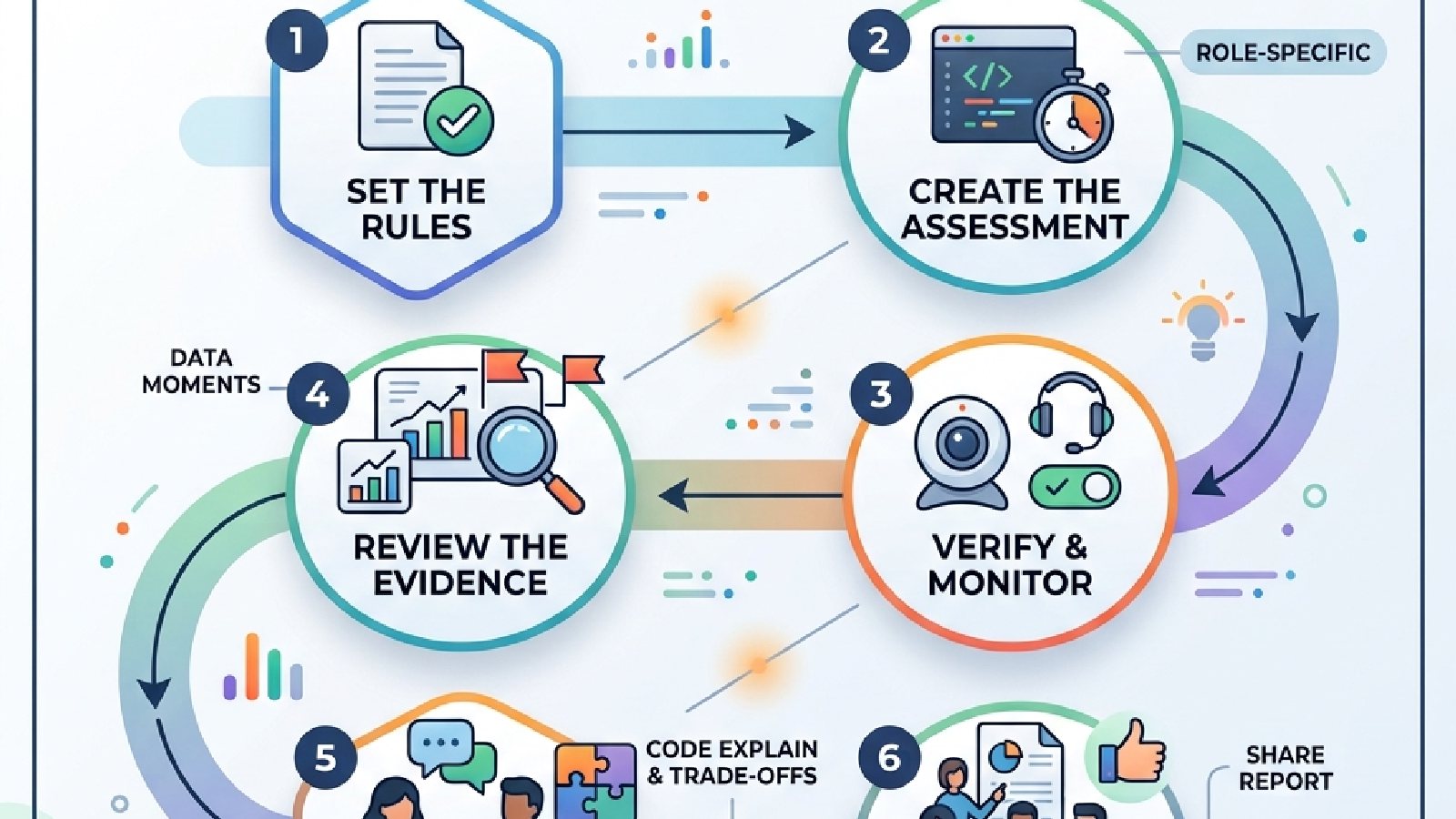
No single feature can stop every AI copilot, overlay, second device, or proxy. The strongest approach combines policy, assessment design, technology, and human judgment.
1. Publish a clear AI-use policy
Tell candidates what they may use before and during each stage. For example, AI may be allowed for preparation but prohibited during a closed-book skills test. If a role is expected to use AI at work, consider a separate AI-permitted exercise that evaluates prompting, verification, and judgment.
State permitted and prohibited tools in plain language.
Explain what monitoring will occur and why.
Provide an accommodation and support route.
Describe the review and appeal process for flagged sessions.
2. Verify identity before the high-stakes stage
Match the candidate to an approved identity document where lawful and appropriate. Keep identity continuity across the assessment and interview, and confirm that the person who completed the test is the person who attends the live round.
3. Put a proctored skills assessment before the live interview
Do not ask the interviewer alone to prove everything. Use a short, role-relevant assessment to establish a trusted baseline. For a developer, that could include coding plus an oral defense. For finance, it could be a timed scenario with a short explanation of assumptions. For customer support, it could be a response task followed by live role-play.
If your organization is replacing manual or paper-led evaluation, this step-by-step guide to moving from paper to online assessments provides a practical migration path.
4. Secure the assessment environment with multiple signals
Combine browser controls with camera and microphone monitoring, identity checks, application and monitor-switch signals, session recording, and—for higher-risk assessments—an auxiliary-device view. A hidden tool that escapes one control may still create evidence across another.
Threat | Why a basic control misses it | Layered response |
Stealth overlay | May not appear in screen sharing | Environment controls + behavioural signals + adaptive follow-up |
Second device | Outside the shared screen | Camera/environment monitoring + optional auxiliary-device proctoring |
Proxy or impersonator | A video call alone may look normal | Identity verification + continuity checks + recorded evidence |
AI-generated coding answer | Correct output can hide weak reasoning | Secure coding task + explanation + changed constraints |
Table 1. A defense-in-depth approach to common remote-hiring threats.
5. Ask questions that require real experience
Move beyond definitions and textbook answers. Ask for a decision, trade-off, mistake, constraint, or consequence from the candidate's own work. Then drill into a detail that was not predictable.
What did you personally own?
What failed, and how did you know?
Which option did you reject and why?
What would you change if the deadline were cut in half?
6. Change the problem during the conversation
Ask the candidate to modify a solution, challenge an assumption, or explain an intermediate step. A person who understands the work can adapt. A person reading generated text may struggle when the context changes faster than the tool can supply a coherent answer.
7. Treat flags as leads, not verdicts
A gaze alert, background voice, tab switch, or second face should trigger review, not automatic rejection. Combine timestamps, recordings, identity evidence, assessment performance, and the candidate's explanation. This reduces both missed misconduct and false accusations.
8. Keep humans accountable for the decision
Human review is essential when an automated system affects a hiring outcome. This aligns with the NIST AI Risk Management Framework's emphasis on governance and oversight and with the need to consider accessibility and discrimination risks highlighted in EEOC resources on AI and the ADA.
For a deeper explanation of this operating model, read coaching.
How the ProctorPlus corporate module strengthens remote hiring
ProctorPlus turns remote hiring from a trust exercise into an evidence-backed workflow. Its corporate module brings proctored pre-employment tests, technical assessments, structured video interviews, candidate management, and integrity reporting into one hiring flow.
Explore the ProctorPlus corporate hiring platform for the current product overview.
Build role-specific assessments, not generic filters
Recruiters can create tests and interview flows from question banks or templates, set timers and rules, and configure proctoring options. Teams can support aptitude, domain, scenario, MCQ, and technical or coding assessments, then use structured interview scripts and scoring guides to make evaluation more consistent.
Verify that the candidate is the candidate
ProctorPlus supports ID verification and impersonation detection, helping organizations connect the person, the assessment session, and the interview evidence. This is especially important for remote-first hiring and roles with access to code, data, finance, infrastructure, or customer systems.
Watch the session from more than one angle
The platform combines camera and microphone tracking with behavioral monitoring, application and monitor-switch controls, screen recording, multi-face detection, and optional auxiliary-device proctoring. These layers do not depend on one suspicious glance or one tab alert. Together, they make covert assistance harder to use without leaving reviewable signals.
Use lockdown and test design together
A secure browser or lockdown control can restrict obvious searching and switching during a closed-book assessment. Randomized questions and answer options reduce copying. Role-specific questions and follow-ups then test whether the candidate can explain and adapt, a part an overlay cannot reliably fake forever.
Give hiring managers evidence, not guesswork
ProctorPlus provides scores, recordings, timestamps, and per-session integrity reports for review. Recruiters can share evidence with hiring panels, export results to Excel or CSV, and connect the workflow with an ATS or HR stack through APIs where needed.
Scale without losing consistency
Candidate invitations, reminders, tracking, bulk upload, and role-based access help talent teams run the same process across dozens or thousands of applicants. Live or asynchronous video interviews give teams flexibility, while shared recordings and scoring guides reduce dependence on one interviewer's memory.
Protect candidate trust
Security must be transparent. ProctorPlus states that it provides encrypted storage, configurable data retention, audit trails, and role-based access. Employers should still configure the platform around local law, data minimization, informed notice, accommodations, and a human review process.
The real advantage: ProctorPlus does not need to guess whether an answer 'sounds like AI.' It helps hiring teams combine identity, environment, behavior, assessment performance, and recorded context into one reviewable decision process. |
Which hiring stages benefit most from ProctorPlus?
The strongest use cases are pre-employment skills tests, technical and coding assessments, high-volume screening, remote-first hiring, structured video interviews, internal certification, and compliance testing, especially where an inaccurate result creates meaningful cost or security risk.
Remote hiring can stay remote and become more trustworthy
AI copilots and stealth overlays have weakened old assumptions about what a webcam and shared screen can prove. That does not mean organizations must abandon remote hiring. It means they need a better process.
Clear rules. Verified identity. Secure, role-relevant assessments. Multiple monitoring signals. Adaptive follow-ups. Human judgment. Reviewable evidence.
ProctorPlus brings those pieces together so talent teams can scale reach without scaling uncertainty.
READY TO SEE WHAT YOUR REMOTE INTERVIEWS ARE MISSING? See how ProctorPlus can secure assessments, surface reviewable evidence, and help your team shortlist genuine talent with confidence. Book your ProctorPlus demo. |
Page